Why the next generation of developer tooling should be usable by both people and AI processes, and how Critical Templates turns team scaffolding into a deterministic shared contract.
There is a quiet problem appearing in modern software teams. It does not look dramatic at first. A developer asks an AI coding agent to add a new component, route, service, test, migration, workflow, or configuration file. The agent understands the request, searches the repository, writes code that looks plausible, and maybe even passes the tests.
But when you inspect the result, something feels slightly off.
The file is in the wrong folder. The naming convention is close, but not quite the same. The test structure does not match the rest of the project. The component is exported differently. The route uses a pattern from another part of the codebase. The AI did not fail in an obvious way. It improvised.
That is the real issue. AI coding tools are powerful at producing code, but software teams do not only need code. They need code that fits a system.
Most mature projects are held together by patterns that are only partially written down. Developers learn them by repetition: where components go, how services are named, how files are grouped, what gets exported, which companion files are created, how tests are structured, how configuration is split, and how new work should feel when it lands in the repository.
Humans absorb these patterns socially. AI agents need them operationally.
This is why I built Critical Templates, a VS Code extension and project-local scaffolding workflow designed around a simple idea:
Developer tooling should be hybrid. It should be comfortable for humans to use directly, and deterministic enough for AI processes to use without guessing.
The source is available on GitHub.
The old boundary between human tools and machine tools is disappearing
For years, developer tools were mainly designed for humans.
We built command palettes, sidebars, buttons, prompts, generators, wizards, and CLIs. The assumptions were clear: a human would choose an option, read the output, correct mistakes, and understand the project context surrounding the operation.
Then AI coding agents arrived and started using the same repositories from another direction. They do not use software the way humans do. They search files, read documentation, call tools, apply patches, run tests, and iterate. They can be fast, but they are only as reliable as the operational surfaces we give them.
This creates a new requirement for developer tools:
They cannot be only graphical interfaces.
They also cannot be only opaque automation scripts.
They need to expose the same project knowledge through multiple surfaces:
- a human-friendly interface inside the editor
- a deterministic command surface for automation
- documentation that explains the contract
- safe behavior around file writes, conflicts, and existing project instructions
That is what I mean by hybrid tooling. Not “AI added to a tool” as a marketing feature. I mean tools that are designed so both humans and AI agents can operate the same workflow, with the same rules, the same templates, and the same output.
Why scaffolding matters more in the AI era
Scaffolding is easy to underestimate. A template generator can look like a small productivity feature. Press a button, create a component, move on.
But scaffolding is really a form of architectural memory.
Every time a team creates a new feature, it repeats decisions:
- Where does this file live?
- What is the folder structure?
- What naming convention do we use?
- Which companion files are required?
- What imports are standard?
- What should be optional?
- Which code should be generated and which code should be written by hand?
When only humans are doing the work, inconsistent scaffolding is annoying but survivable. Code review catches it. Senior developers correct it. The team gradually converges.
When AI agents are added to the workflow, inconsistency can scale quickly. Agents can create a lot of files in a short amount of time. If they do not have deterministic rules, they will infer patterns from incomplete context. Sometimes they will infer correctly. Sometimes they will copy an older pattern. Sometimes they will invent a new one that seems reasonable but does not belong.
That is not because the model is bad. It is because the project has not given the agent a strong enough contract.
Critical Templates treats scaffolding as that contract.
The team defines reusable templates under .critical-templates. Humans can generate from them in VS Code. AI agents can list, inspect, plan, and generate from the same templates through a project-local CLI. The output is no longer an improvisation. It is a decision encoded by the project.
What Critical Templates does
Critical Templates is a VS Code extension for generating files from workspace templates.
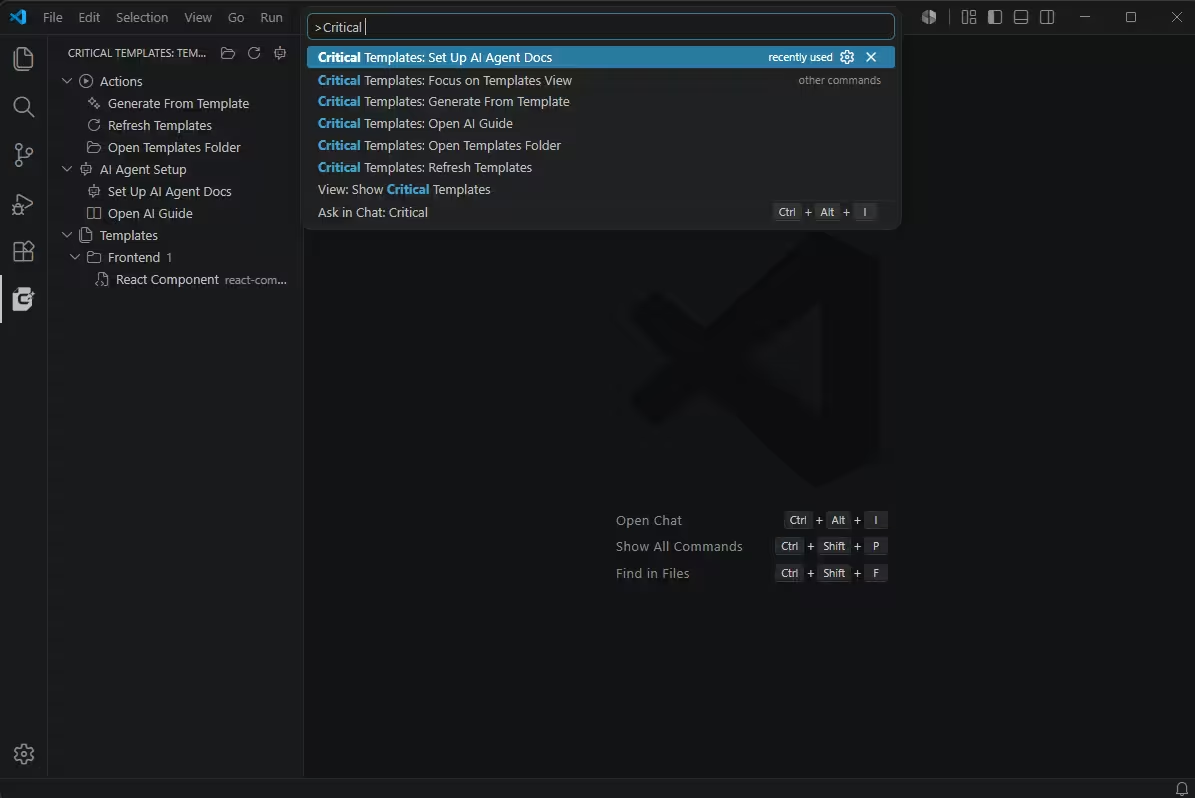
At the human level, it adds a Critical Templates panel to VS Code. The panel groups actions, AI setup, and templates by category. A developer can click “Generate From Template”, choose a template, answer native VS Code prompts, and let the extension create the files.
At the project level, templates live in the repository:
.critical-templates/
  react-component/
    template.yaml
    files/
      src/components/{{pascalName}}/{{pascalName}}.tsx.hbs
      src/components/{{pascalName}}/{{pascalName}}.scss.hbs
The manifest describes the template:
apiVersion: criticaltemplates/v1
id: react-component
title: React Component
description: Generate a React component with an optional SCSS file.
category: frontend
engine: handlebars
root: files
conflictPolicy: ask
skipEmptyFiles: true
variablesSchema:
  type: object
  additionalProperties: false
  properties:
    name:
      type: string
      minLength: 2
      description: Component name, for example Button
    withScss:
      type: boolean
      default: true
      description: Include SCSS file and import
  required:
    - name
ui:
  order:
    - name
    - withScss
computed:
  pascalName: "{{pascalCase name}}"
  kebabName: "{{kebabCase name}}"
The template file can then use those values:
import React from "react";
{{#if withScss}}
import "./{{pascalName}}.scss";
{{/if}}

const {{pascalName}} = () => {
  return <div className="{{kebabName}}-container"></div>;
};

export default {{pascalName}};
If a developer enters Button and chooses to include SCSS, the generated structure is:
src/components/Button/Button.tsx
src/components/Button/Button.scss
If SCSS is disabled, the SCSS file is skipped and the import line is not generated. The template remains one template, not two almost-identical templates.
That sounds simple. The important part is what it enables.
The same workflow for humans and AI agents
A human can use the VS Code panel.
An AI agent can use the CLI:
node .codex/tools/critical-templates-cli.cjs list --workspace .
node .codex/tools/critical-templates-cli.cjs inspect react-component --workspace .
node .codex/tools/critical-templates-cli.cjs plan react-component --workspace . --var name=Button --var withScss=true
node .codex/tools/critical-templates-cli.cjs generate react-component --workspace . --var name=Button --var withScss=true --conflict overwrite
This is the core design decision. I do not want an AI agent to “look around and guess how we create components.” I want it to call a project-owned generator that already knows.
The extension includes a command called Critical Templates: Set Up AI Agent Docs. When run inside a consumer project, it installs:
.codex/tools/critical-templates-cli.cjs
.codex/skills/critical-templates/SKILL.md
docs/ai/critical-templates.md
AGENTS.md
The generated docs tell Codex-style agents how to use templates before creating new files by hand. The CLI is copied locally into the project, so the agent has a deterministic tool available even outside the VS Code UI.
This is where the hybrid model becomes practical. Humans get a friendly editor flow. Agents get a scriptable interface. The project owns the templates. Everyone uses the same source of truth.
Why this improves AI coding agents
AI agents usually fail in one of three ways when creating new files.
First, they guess the wrong structure. They may create src/components/Button.tsx when the team expects src/components/Button/Button.tsx.
Second, they miss companion files. They create the component but forget the style file, test file, story file, route registration, or index export.
Third, they create something that is locally correct but culturally wrong. The code compiles, but it does not feel like the rest of the codebase.
Templates reduce those failures because they turn repeated decisions into executable project knowledge.
Instead of prompting an agent with:
Create a new React component following our conventions.
you can make the project say:
The convention is encoded in
react-component. Use it.
That changes the agent’s job. It no longer has to infer the boring structure. It can focus on the feature-specific logic after the scaffold exists.
This matters because the best use of AI in software development is not to let it make every decision. It is to separate deterministic decisions from creative or contextual decisions.
File layout should usually be deterministic.
Naming should usually be deterministic.
Boilerplate should usually be deterministic.
Business logic, UX details, edge cases, and integration behavior are where the agent can spend its reasoning budget.
Why this also helps humans
It would be a mistake to frame this only as an AI tool.
Humans benefit from the same structure. A good template removes friction and reduces small mistakes. New team members can generate the right files without memorizing every convention. Senior developers do not have to repeat the same review comments. Teams can evolve patterns by updating templates instead of relying on word-of-mouth.
There is also a psychological benefit: a project feels more coherent when common operations are easy and official.
If the team has a known way to create a component, route, worker, service, or ADR, the tool should make that path obvious. It should not require copying an old file and manually cleaning it up. Copy-paste is a hidden source of architectural drift.
Critical Templates turns those repeated operations into named actions.
Examples of usage
The React component example is the simplest one, but the same idea applies to many project artifacts.
Frontend components
A component template can generate:
src/components/Button/Button.tsx
src/components/Button/Button.scss
src/components/Button/index.ts
The manifest can ask whether to include SCSS, tests, Storybook stories, or accessibility examples.
An AI agent asked to “add a pricing card component” can first generate the correct folder and files, then edit the generated component with the actual UI.
Backend routes
A backend route template can generate:
src/routes/users.ts
src/controllers/users.controller.ts
src/services/users.service.ts
src/schemas/users.schema.ts
Variables can include the resource name, HTTP method, authentication mode, and whether to include validation.
The important part is that route structure becomes explicit. Agents do not have to infer whether this codebase uses controllers, handlers, services, or inline route logic.
Architecture Decision Records
An ADR template can generate:
docs/adr/2026-06-11-use-critical-templates-for-scaffolding.mdThe manifest can ask for title, status, context, decision, consequences, and owners.
This is particularly useful for AI agents because documentation tasks often fail through vague formatting. A template makes the document shape stable.
CI workflows
A GitHub Actions template can generate:
.github/workflows/ci.ymlVariables can include package manager, Node version, test command, build command, and deployment target.
Again, the value is not that a model cannot write YAML. The value is that the team decides which YAML belongs in this repository.
AI agent setup itself
The AI setup command is another example of the same philosophy. It installs project-local instructions and a local CLI so agents can use the templates.
It also does this carefully. Existing AGENTS.md content is preserved. Critical Templates updates only its managed section. Existing unmarked skill or guide files require confirmation before replacement.
That matters because AI tooling should not casually overwrite a team’s existing instructions. Hybrid tools have to respect human ownership.
Safety matters when tools write files
A generator is useful only if it behaves predictably.
Critical Templates includes several safety decisions that I consider important:
- Generation requires Workspace Trust in VS Code.
- Generated paths are validated so templates cannot escape the selected workspace.
- Handlebars and Liquid can be disabled through settings.
- EJS-style arbitrary JavaScript templates are intentionally not supported.
- Existing file conflicts can be handled with ask, overwrite, skip, or rename.
- If a multi-file generation fails partway through, the VS Code and CLI paths attempt rollback by deleting newly created files and restoring overwritten ones.
- The extension does not send template contents, variable values, or generated files to external services.
These details are not glamorous, but they are the difference between a demo and a tool I would trust in a real repository.
AI agent workflows need this kind of boring reliability. The more autonomy we give agents, the more deterministic the surrounding tools need to become.
The bigger pattern: encode more project knowledge as tools
Critical Templates is a small piece of a larger direction I believe in.
AI coding agents should not be asked to rediscover every convention from raw files every time they work. Some knowledge should be encoded as tools, schemas, commands, tests, and templates.
This does not make the agent less intelligent. It makes the environment more legible.
The future of software development is not just better models. It is better interfaces between models and projects.
A repository should be able to tell both humans and agents:
- how to create a component
- how to add a route
- how to write a test
- how to document a decision
- how to run verification
- what not to touch
- what patterns are official
Some of that belongs in prose. Some belongs in tests. Some belongs in linters. Some belongs in templates.
The best systems will combine all of them.
What makes a tool truly hybrid
A hybrid developer tool is not just a tool with an API.
It has to satisfy both sides of the workflow.
For humans, it should be discoverable, friendly, and integrated into the editor. It should not force people into terminal commands for everyday work if the editor is the natural place to act.
For AI processes, it should be deterministic, inspectable, and scriptable. It should return structured output. It should be safe to call. It should not depend on fragile UI automation.
For the project, it should be versioned. The rules should live in the repository. Changes should be reviewed like code. When the team updates a pattern, humans and agents should both inherit the change.
Critical Templates tries to follow that model:
- VS Code panel for humans
- local CLI for agents
.critical-templatesas project-owned contractAGENTS.mdand Codex skill docs for agent behavior- rollback and path safety for file operations
It is not a giant platform. It is a focused tool for one important boundary: creating new files in the right shape.
That boundary is more important than it looks.
Where to get it
You can install Critical Templates from the Visual Studio Marketplace:
Critical Templates on Visual Studio Marketplace
The source code is available here:
criticaldeveloper/critical-toucher on GitHub
If you try it, I would start by adding one or two templates for the files your team creates most often. Do not try to model the whole codebase on day one. Pick the repeated operation that causes the most drift: a component, a route, a service, a workflow, an ADR.
Once that pattern is encoded, both developers and agents get a better default.
That is the point. Not automation for its own sake, and not AI as a decoration over existing workflows. The point is to build software environments where human intent and machine execution meet through clear, versioned, deterministic contracts.
That is where I think developer tools are going.